Blackboards
Blackboards are not a necessary component of behaviour tree implementations, but are nonetheless, a fairly common mechanism for for sharing data between behaviours in the tree. See, for example, the design notes for blackboards in Unreal Engine.
Implementations vary widely depending on the needs of the framework using them. The simplest implementations take the form of a key-value store with global access, while more rigorous implementations scope access and form a secondary graph overlaying the tree graph connecting data ports between behaviours.
The implementation here strives to remain simple to use (so ‘rapid development’ does not become just ‘development’), yet sufficiently featured so that the magic behind the scenes (i.e. the data sharing on the blackboard) is exposed and helpful in debugging tree applications.
To be more concrete, the following is a list of features that this implementation either embraces or does not.
- [+] Centralised key-value store
- [+] Client style usage with registration of read/write access
- [+] Activity stream that logs read/write operations by clients
- [+] Integration with behaviors for key-behaviour associations (debugging)
- [-] Exclusive locks for writing
- [-] Sharing between tree instances
- [-] Priority policies for variable instantiations
The primary user-facing interface with the blackboard is via the Client.
-
class
py_trees.blackboard.Client(*, name=None, namespace=None)[source] Client to the key-value store for sharing data between behaviours.
Examples
Blackboard clients will accept a user-friendly name / unique identifier for registration on the centralised store or create them for you if none is provided.
provided = py_trees.blackboard.Client(name="Provided")
print(provided)
generated = py_trees.blackboard.Client()
print(generated)
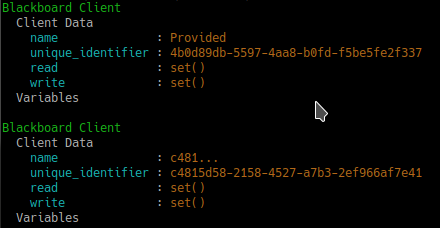
Client Instantiation
Register read/write access for keys on the blackboard. Note, registration is not initialisation.
blackboard = py_trees.blackboard.Client(name="Client")
blackboard.register_key(key="foo", access=py_trees.common.Access.WRITE)
blackboard.register_key(key="bar", access=py_trees.common.Access.READ)
blackboard.foo = "foo"
print(blackboard)
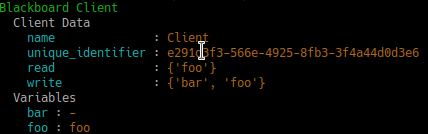
Variable Read/Write Registration
Disconnected instances will discover the centralised key-value store.
def check_foo():
    blackboard = py_trees.blackboard.Client(name="Reader")
    blackboard.register_key(key="foo", access=py_trees.common.Access.READ)
    print("Foo: {}".format(blackboard.foo))


blackboard = py_trees.blackboard.Client(name="Writer")
blackboard.register_key(key="foo", access=py_trees.common.Access.WRITE)
blackboard.foo = "bar"
check_foo()
To respect an already initialised key on the blackboard:
blackboard = Client(name="Writer")
blackboard.register_key(key="foo", access=py_trees.common.Access.READ)
result = blackboard.set("foo", "bar", overwrite=False)
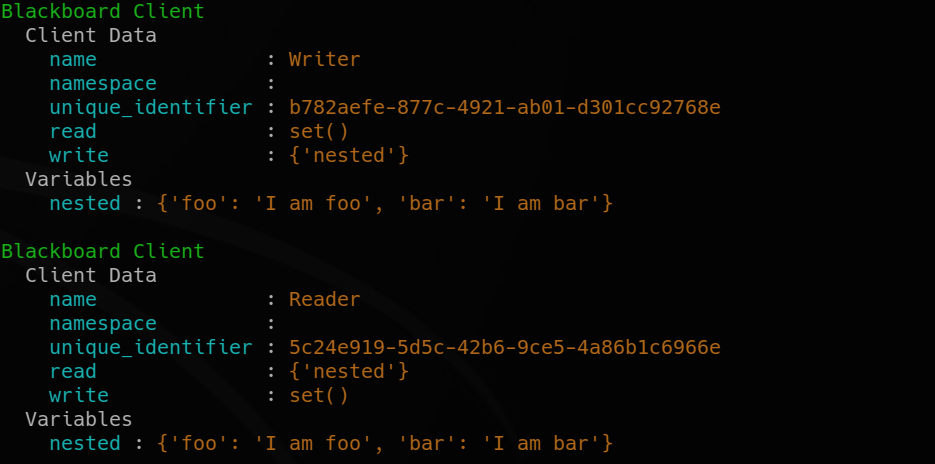
Store complex objects on the blackboard:
class Nested(object):
    def __init__(self):
        self.foo = None
        self.bar = None

    def __str__(self):
        return str(self.__dict__)


writer = py_trees.blackboard.Client(name="Writer")
writer.register_key(key="nested", access=py_trees.common.Access.WRITE)
reader = py_trees.blackboard.Client(name="Reader")
reader.register_key(key="nested", access=py_trees.common.Access.READ)

writer.nested = Nested()
writer.nested.foo = "I am foo"
writer.nested.bar = "I am bar"

foo = reader.nested.foo
print(writer)
print(reader)
Log and display the activity stream:
py_trees.blackboard.Blackboard.enable_activity_stream(maximum_size=100)
reader = py_trees.blackboard.Client(name="Reader")
reader.register_key(key="foo", access=py_trees.common.Access.READ)
writer = py_trees.blackboard.Client(name="Writer")
writer.register_key(key="foo", access=py_trees.common.Access.WRITE)
writer.foo = "bar"
writer.foo = "foobar"
unused_result = reader.foo
print(py_trees.display.unicode_blackboard_activity_stream())
py_trees.blackboard.Blackboard.activity_stream.clear()

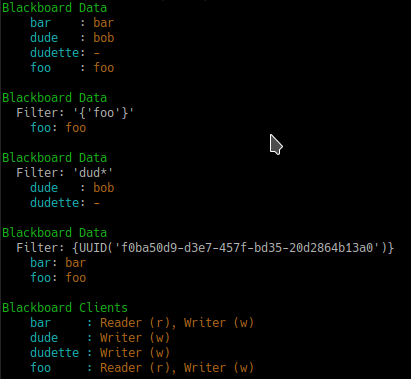
Display the blackboard on the console, or part thereof:
writer = py_trees.blackboard.Client(name="Writer")
for key in {"foo", "bar", "dude", "dudette"}:
    writer.register_key(key=key, access=py_trees.common.Access.WRITE)

reader = py_trees.blackboard.Client(name="Reader")
for key in {"foo", "bar"}:
    reader.register_key(key="key", access=py_trees.common.Access.READ)

writer.foo = "foo"
writer.bar = "bar"
writer.dude = "bob"

# all key-value pairs
print(py_trees.display.unicode_blackboard())
# various filtered views
print(py_trees.display.unicode_blackboard(key_filter={"foo"}))
print(py_trees.display.unicode_blackboard(regex_filter="dud*"))
print(py_trees.display.unicode_blackboard(client_filter={reader.unique_identifier}))
# list the clients associated with each key
print(py_trees.display.unicode_blackboard(display_only_key_metadata=True))
Behaviours are not automagically connected to the blackboard but you may manually attach one or more clients so that associations between behaviours and variables can be tracked - this is very useful for introspection and debugging.
Creating a custom behaviour with blackboard variables:
class Foo(py_trees.behaviour.Behaviour):

    def __init__(self, name):
        super().__init__(name=name)
        self.blackboard = self.attach_blackboard_client(name="Foo Global")
        self.parameters = self.attach_blackboard_client(name="Foo Params", namespace="foo_parameters_")
        self.state = self.attach_blackboard_client(name="Foo State", namespace="foo_state_")

        # create a key 'foo_parameters_init' on the blackboard
        self.parameters.register_key("init", access=py_trees.common.Access.READ)
        # create a key 'foo_state_number_of_noodles' on the blackboard
        self.state.register_key("number_of_noodles", access=py_trees.common.Access.WRITE)

    def initialise(self):
        self.state.number_of_noodles = self.parameters.init

    def update(self):
        self.state.number_of_noodles += 1
        self.feedback_message = self.state.number_of_noodles
        if self.state.number_of_noodles > 5:
            return py_trees.common.Status.SUCCESS
        else:
            return py_trees.common.Status.RUNNING


# could equivalently do directly via the Blackboard static methods if
# not interested in tracking / visualising the application configuration
configuration = py_trees.blackboard.Client(name="App Config")
configuration.register_key("foo_parameters_init", access=py_trees.common.Access.WRITE)
configuration.foo_parameters_init = 3

foo = Foo(name="The Foo")
for i in range(1, 8):
    foo.tick_once()
    print("Number of Noodles: {}".format(foo.feedback_message))
Rendering a dot graph for a behaviour tree, complete with blackboard variables:
# in code
py_trees.display.render_dot_tree(py_trees.demos.blackboard.create_root())
# command line tools
py-trees-render --with-blackboard-variables py_trees.demos.blackboard.create_root
![digraph pastafarianism {
graph [fontname="times-roman"];
node [fontname="times-roman"];
edge [fontname="times-roman"];
"Blackboard Demo" [label="Blackboard Demo", shape=box, style=filled, fillcolor=orange, fontsize=9, fontcolor=black];
"Set Nested" [label="Set Nested", shape=ellipse, style=filled, fillcolor=gray, fontsize=9, fontcolor=black];
"Blackboard Demo" -> "Set Nested";
Writer [label=Writer, shape=ellipse, style=filled, fillcolor=gray, fontsize=9, fontcolor=black];
"Blackboard Demo" -> Writer;
"Check Nested Foo" [label="Check Nested Foo", shape=ellipse, style=filled, fillcolor=gray, fontsize=9, fontcolor=black];
"Blackboard Demo" -> "Check Nested Foo";
subgraph {
label="children_of_Blackboard Demo";
rank=same;
"Set Nested" [label="Set Nested", shape=ellipse, style=filled, fillcolor=gray, fontsize=9, fontcolor=black];
Writer [label=Writer, shape=ellipse, style=filled, fillcolor=gray, fontsize=9, fontcolor=black];
"Check Nested Foo" [label="Check Nested Foo", shape=ellipse, style=filled, fillcolor=gray, fontsize=9, fontcolor=black];
}
Standalone [label=Standalone, shape=ellipse, style=filled, color=blue, fillcolor=gray, fontsize=7, fontcolor=blue];
dude [label="dude: Bob", shape=box, style=filled, color=blue, fillcolor=white, fontsize=8, fontcolor=blue, width=0, height=0, fixedsize=False];
dude -> Writer [color=blue, constraint=False];
Standalone -> dude [color=blue, constraint=False];
nested [label="nested: -", shape=box, style=filled, color=blue, fillcolor=white, fontsize=8, fontcolor=blue, width=0, height=0, fixedsize=False];
nested -> "Check Nested Foo" [color=blue, constraint=False];
"Set Nested" -> nested [color=blue, constraint=True];
spaghetti [label="spaghetti: -", shape=box, style=filled, color=blue, fillcolor=white, fontsize=8, fontcolor=blue, width=0, height=0, fixedsize=False];
Writer -> spaghetti [color=blue, constraint=True];
}](_images/graphviz-226977f91f7a92718e7cd73a121110374e4a3102.png)
Tree with Blackboard Variables
And to demonstrate that it doesn’t become a tangled nightmare at scale, an example of a more complex tree:
![digraph pastafarianism {
graph [fontname="times-roman"];
node [fontname="times-roman"];
edge [fontname="times-roman"];
"Tutorial Eight" [label="Tutorial Eight\n--SuccessOnAll(-)--", shape=parallelogram, style=filled, fillcolor=gold, fontsize=9, fontcolor=black];
Topics2BB [label=Topics2BB, shape=box, style=filled, fillcolor=orange, fontsize=9, fontcolor=black];
"Tutorial Eight" -> Topics2BB;
Scan2BB [label=Scan2BB, shape=ellipse, style=filled, fillcolor=gray, fontsize=9, fontcolor=black];
Topics2BB -> Scan2BB;
Cancel2BB [label=Cancel2BB, shape=ellipse, style=filled, fillcolor=gray, fontsize=9, fontcolor=black];
Topics2BB -> Cancel2BB;
Battery2BB [label=Battery2BB, shape=ellipse, style=filled, fillcolor=gray, fontsize=9, fontcolor=black];
Topics2BB -> Battery2BB;
subgraph {
label=children_of_Topics2BB;
rank=same;
Scan2BB [label=Scan2BB, shape=ellipse, style=filled, fillcolor=gray, fontsize=9, fontcolor=black];
Cancel2BB [label=Cancel2BB, shape=ellipse, style=filled, fillcolor=gray, fontsize=9, fontcolor=black];
Battery2BB [label=Battery2BB, shape=ellipse, style=filled, fillcolor=gray, fontsize=9, fontcolor=black];
}
Tasks [label=Tasks, shape=octagon, style=filled, fillcolor=cyan, fontsize=9, fontcolor=black];
"Tutorial Eight" -> Tasks;
"Battery Low?" [label="Battery Low?", shape=ellipse, style=filled, fillcolor=ghostwhite, fontsize=9, fontcolor=black];
Tasks -> "Battery Low?";
"Flash Red" [label="Flash Red", shape=ellipse, style=filled, fillcolor=gray, fontsize=9, fontcolor=black];
"Battery Low?" -> "Flash Red";
Scan [label=Scan, shape=box, style=filled, fillcolor=orange, fontsize=9, fontcolor=black];
Tasks -> Scan;
"Scan or Die" [label="Scan or Die", shape=octagon, style=filled, fillcolor=cyan, fontsize=9, fontcolor=black];
Scan -> "Scan or Die";
"Ere we Go" [label="Ere we Go", shape=box, style=filled, fillcolor=orange, fontsize=9, fontcolor=black];
"Scan or Die" -> "Ere we Go";
UnDock [label=UnDock, shape=ellipse, style=filled, fillcolor=gray, fontsize=9, fontcolor=black];
"Ere we Go" -> UnDock;
"Scan or Be Cancelled" [label="Scan or Be Cancelled", shape=octagon, style=filled, fillcolor=cyan, fontsize=9, fontcolor=black];
"Ere we Go" -> "Scan or Be Cancelled";
"Cancelling?" [label="Cancelling?", shape=box, style=filled, fillcolor=orange, fontsize=9, fontcolor=black];
"Scan or Be Cancelled" -> "Cancelling?";
"Cancel?" [label="Cancel?", shape=ellipse, style=filled, fillcolor=gray, fontsize=9, fontcolor=black];
"Cancelling?" -> "Cancel?";
"Move Home" [label="Move Home", shape=ellipse, style=filled, fillcolor=gray, fontsize=9, fontcolor=black];
"Cancelling?" -> "Move Home";
"Result2BB\n'cancelled'" [label="Result2BB\n'cancelled'", shape=ellipse, style=filled, fillcolor=gray, fontsize=9, fontcolor=black];
"Cancelling?" -> "Result2BB\n'cancelled'";
subgraph {
label="children_of_Cancelling?";
rank=same;
"Cancel?" [label="Cancel?", shape=ellipse, style=filled, fillcolor=gray, fontsize=9, fontcolor=black];
"Move Home" [label="Move Home", shape=ellipse, style=filled, fillcolor=gray, fontsize=9, fontcolor=black];
"Result2BB\n'cancelled'" [label="Result2BB\n'cancelled'", shape=ellipse, style=filled, fillcolor=gray, fontsize=9, fontcolor=black];
}
"Move Out and Scan" [label="Move Out and Scan", shape=box, style=filled, fillcolor=orange, fontsize=9, fontcolor=black];
"Scan or Be Cancelled" -> "Move Out and Scan";
"Move Out" [label="Move Out", shape=ellipse, style=filled, fillcolor=gray, fontsize=9, fontcolor=black];
"Move Out and Scan" -> "Move Out";
Scanning [label="Scanning\n--SuccessOnOne--", shape=parallelogram, style=filled, fillcolor=gold, fontsize=9, fontcolor=black];
"Move Out and Scan" -> Scanning;
"Context Switch" [label="Context Switch", shape=ellipse, style=filled, fillcolor=gray, fontsize=9, fontcolor=black];
Scanning -> "Context Switch";
Rotate [label=Rotate, shape=ellipse, style=filled, fillcolor=gray, fontsize=9, fontcolor=black];
Scanning -> Rotate;
"Flash Blue" [label="Flash Blue", shape=ellipse, style=filled, fillcolor=gray, fontsize=9, fontcolor=black];
Scanning -> "Flash Blue";
subgraph {
label=children_of_Scanning;
rank=same;
"Context Switch" [label="Context Switch", shape=ellipse, style=filled, fillcolor=gray, fontsize=9, fontcolor=black];
Rotate [label=Rotate, shape=ellipse, style=filled, fillcolor=gray, fontsize=9, fontcolor=black];
"Flash Blue" [label="Flash Blue", shape=ellipse, style=filled, fillcolor=gray, fontsize=9, fontcolor=black];
}
"Move Home*" [label="Move Home*", shape=ellipse, style=filled, fillcolor=gray, fontsize=9, fontcolor=black];
"Move Out and Scan" -> "Move Home*";
"Result2BB\n'succeeded'" [label="Result2BB\n'succeeded'", shape=ellipse, style=filled, fillcolor=gray, fontsize=9, fontcolor=black];
"Move Out and Scan" -> "Result2BB\n'succeeded'";
subgraph {
label="children_of_Move Out and Scan";
rank=same;
"Move Out" [label="Move Out", shape=ellipse, style=filled, fillcolor=gray, fontsize=9, fontcolor=black];
Scanning [label="Scanning\n--SuccessOnOne--", shape=parallelogram, style=filled, fillcolor=gold, fontsize=9, fontcolor=black];
"Move Home*" [label="Move Home*", shape=ellipse, style=filled, fillcolor=gray, fontsize=9, fontcolor=black];
"Result2BB\n'succeeded'" [label="Result2BB\n'succeeded'", shape=ellipse, style=filled, fillcolor=gray, fontsize=9, fontcolor=black];
}
subgraph {
label="children_of_Scan or Be Cancelled";
rank=same;
"Cancelling?" [label="Cancelling?", shape=box, style=filled, fillcolor=orange, fontsize=9, fontcolor=black];
"Move Out and Scan" [label="Move Out and Scan", shape=box, style=filled, fillcolor=orange, fontsize=9, fontcolor=black];
}
Dock [label=Dock, shape=ellipse, style=filled, fillcolor=gray, fontsize=9, fontcolor=black];
"Ere we Go" -> Dock;
Celebrate [label="Celebrate\n--SuccessOnOne--", shape=parallelogram, style=filled, fillcolor=gold, fontsize=9, fontcolor=black];
"Ere we Go" -> Celebrate;
"Flash Green" [label="Flash Green", shape=ellipse, style=filled, fillcolor=gray, fontsize=9, fontcolor=black];
Celebrate -> "Flash Green";
Pause [label=Pause, shape=ellipse, style=filled, fillcolor=gray, fontsize=9, fontcolor=black];
Celebrate -> Pause;
subgraph {
label=children_of_Celebrate;
rank=same;
"Flash Green" [label="Flash Green", shape=ellipse, style=filled, fillcolor=gray, fontsize=9, fontcolor=black];
Pause [label=Pause, shape=ellipse, style=filled, fillcolor=gray, fontsize=9, fontcolor=black];
}
subgraph {
label="children_of_Ere we Go";
rank=same;
UnDock [label=UnDock, shape=ellipse, style=filled, fillcolor=gray, fontsize=9, fontcolor=black];
"Scan or Be Cancelled" [label="Scan or Be Cancelled", shape=octagon, style=filled, fillcolor=cyan, fontsize=9, fontcolor=black];
Dock [label=Dock, shape=ellipse, style=filled, fillcolor=gray, fontsize=9, fontcolor=black];
Celebrate [label="Celebrate\n--SuccessOnOne--", shape=parallelogram, style=filled, fillcolor=gold, fontsize=9, fontcolor=black];
}
Die [label=Die, shape=box, style=filled, fillcolor=orange, fontsize=9, fontcolor=black];
"Scan or Die" -> Die;
Notification [label="Notification\n--SuccessOnOne--", shape=parallelogram, style=filled, fillcolor=gold, fontsize=9, fontcolor=black];
Die -> Notification;
"Flash Red*" [label="Flash Red*", shape=ellipse, style=filled, fillcolor=gray, fontsize=9, fontcolor=black];
Notification -> "Flash Red*";
"Pause*" [label="Pause*", shape=ellipse, style=filled, fillcolor=gray, fontsize=9, fontcolor=black];
Notification -> "Pause*";
subgraph {
label=children_of_Notification;
rank=same;
"Flash Red*" [label="Flash Red*", shape=ellipse, style=filled, fillcolor=gray, fontsize=9, fontcolor=black];
"Pause*" [label="Pause*", shape=ellipse, style=filled, fillcolor=gray, fontsize=9, fontcolor=black];
}
"Result2BB\n'failed'" [label="Result2BB\n'failed'", shape=ellipse, style=filled, fillcolor=gray, fontsize=9, fontcolor=black];
Die -> "Result2BB\n'failed'";
subgraph {
label=children_of_Die;
rank=same;
Notification [label="Notification\n--SuccessOnOne--", shape=parallelogram, style=filled, fillcolor=gold, fontsize=9, fontcolor=black];
"Result2BB\n'failed'" [label="Result2BB\n'failed'", shape=ellipse, style=filled, fillcolor=gray, fontsize=9, fontcolor=black];
}
subgraph {
label="children_of_Scan or Die";
rank=same;
"Ere we Go" [label="Ere we Go", shape=box, style=filled, fillcolor=orange, fontsize=9, fontcolor=black];
Die [label=Die, shape=box, style=filled, fillcolor=orange, fontsize=9, fontcolor=black];
}
"Send Result" [label="Send Result", shape=ellipse, style=filled, fillcolor=gray, fontsize=9, fontcolor=black];
Scan -> "Send Result";
subgraph {
label=children_of_Scan;
rank=same;
"Scan or Die" [label="Scan or Die", shape=octagon, style=filled, fillcolor=cyan, fontsize=9, fontcolor=black];
"Send Result" [label="Send Result", shape=ellipse, style=filled, fillcolor=gray, fontsize=9, fontcolor=black];
}
Idle [label=Idle, shape=ellipse, style=filled, fillcolor=gray, fontsize=9, fontcolor=black];
Tasks -> Idle;
subgraph {
label=children_of_Tasks;
rank=same;
"Battery Low?" [label="Battery Low?", shape=ellipse, style=filled, fillcolor=ghostwhite, fontsize=9, fontcolor=black];
Scan [label=Scan, shape=box, style=filled, fillcolor=orange, fontsize=9, fontcolor=black];
Idle [label=Idle, shape=ellipse, style=filled, fillcolor=gray, fontsize=9, fontcolor=black];
}
subgraph {
label="children_of_Tutorial Eight";
rank=same;
Topics2BB [label=Topics2BB, shape=box, style=filled, fillcolor=orange, fontsize=9, fontcolor=black];
Tasks [label=Tasks, shape=octagon, style=filled, fillcolor=cyan, fontsize=9, fontcolor=black];
}
event_scan_button [label="event_scan_button: -", shape=box, style=filled, color=blue, fillcolor=white, fontsize=8, fontcolor=blue, width=0, height=0, fixedsize=False];
Scan2BB -> event_scan_button [color=blue, constraint=True];
event_cancel_button [label="event_cancel_button: -", shape=box, style=filled, color=blue, fillcolor=white, fontsize=8, fontcolor=blue, width=0, height=0, fixedsize=False];
event_cancel_button -> "Cancel?" [color=blue, constraint=False];
Cancel2BB -> event_cancel_button [color=blue, constraint=True];
battery [label="battery: sensor_msgs.msg.B...", shape=box, style=filled, color=blue, fillcolor=white, fontsize=8, fontcolor=blue, width=0, height=0, fixedsize=False];
Battery2BB -> battery [color=blue, constraint=True];
battery_low_warning [label="battery_low_warning: False", shape=box, style=filled, color=blue, fillcolor=white, fontsize=8, fontcolor=blue, width=0, height=0, fixedsize=False];
battery_low_warning -> "Battery Low?" [color=blue, constraint=False];
Battery2BB -> battery_low_warning [color=blue, constraint=True];
scan_result [label="scan_result: -", shape=box, style=filled, color=blue, fillcolor=white, fontsize=8, fontcolor=blue, width=0, height=0, fixedsize=False];
scan_result -> "Send Result" [color=blue, constraint=False];
"Result2BB\n'cancelled'" -> scan_result [color=blue, constraint=True];
"Result2BB\n'succeeded'" -> scan_result [color=blue, constraint=True];
"Result2BB\n'failed'" -> scan_result [color=blue, constraint=True];
}](_images/graphviz-318cdbb66411f18cf82abf341abc575d082ed308.png)
A more complex tree
Debug deeper with judicious application of the tree, blackboard and activity stream display methods around the tree tick (refer to
py_trees.visitors.DisplaySnapshotVisitorfor examplar code):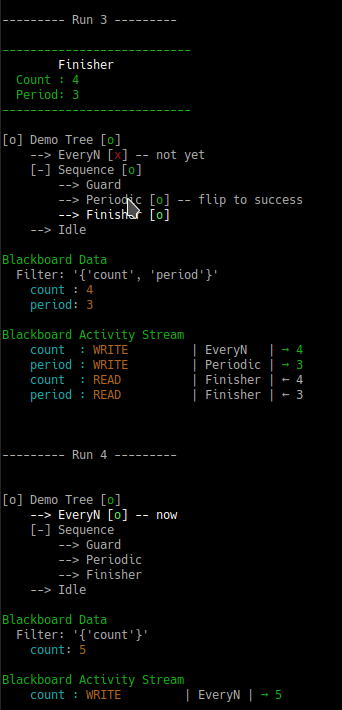
Tree level debugging
See also
- py-trees-demo-blackboard
py_trees.visitors.DisplaySnapshotVisitorpy_trees.behaviours.SetBlackboardVariablepy_trees.behaviours.UnsetBlackboardVariablepy_trees.behaviours.CheckBlackboardVariableExistspy_trees.behaviours.WaitForBlackboardVariablepy_trees.behaviours.CheckBlackboardVariableValuepy_trees.behaviours.WaitForBlackboardVariableValue
Variables: